| 1 | <h1 align="center">🎬 Pixelle-Video —— AI Fully Automated Short Video Engine</h1> |
| 2 | |
| 3 | <p align="center"><b>English</b> | <a href="README.md">中文</a></p> |
| 4 | |
| 5 | <p align="center"> |
| 6 | <a href="https://www.youtube.com/watch?v=uUkx-lRxLjc" target="_blank"><img src="https://img.shields.io/badge/🎥 Video%20Tutorial-EA4C89" alt="Video Tutorial"></a> |
| 7 | <a href="https://github.com/AIDC-AI/Pixelle-Video/releases" target="_blank"><img src="https://img.shields.io/badge/📦 Windows-50C878" alt="Windows Package"></a> |
| 8 | <a href="https://aidc-ai.github.io/Pixelle-Video" target="_blank"><img src="https://img.shields.io/badge/📘 Documentation-4A90E2" alt="Documentation"></a> |
| 9 | <a href="https://github.com/AIDC-AI/Pixelle-Video/stargazers"><img src="https://img.shields.io/github/stars/AIDC-AI/Pixelle-Video.svg" alt="Stargazers"></a> |
| 10 | <a href="https://github.com/AIDC-AI/Pixelle-Video/issues"><img src="https://img.shields.io/github/issues/AIDC-AI/Pixelle-Video.svg" alt="Issues"></a> |
| 11 | <a href="https://github.com/AIDC-AI/Pixelle-Video/network/members"><img src="https://img.shields.io/github/forks/AIDC-AI/Pixelle-Video.svg" alt="Forks"></a> |
| 12 | <a href="https://github.com/AIDC-AI/Pixelle-Video/blob/main/LICENSE"><img src="https://img.shields.io/github/license/AIDC-AI/Pixelle-Video.svg" alt="License"></a> |
| 13 | </p> |
| 14 | |
| 15 | https://github.com/user-attachments/assets/a42e7457-fcc8-40da-83fc-784c45a8b95d |
| 16 | |
| 17 | Just input a **topic**, and Pixelle-Video will automatically: |
| 18 | - ✍️ Write video script |
| 19 | - 🎨 Generate AI images/videos |
| 20 | - 🗣️ Synthesize voice narration |
| 21 | - 🎵 Add background music |
| 22 | - 🎬 Create video with one click |
| 23 | |
| 24 | |
| 25 | **Zero threshold, zero editing experience** - Make video creation as simple as typing a sentence! |
| 26 | |
| 27 | |
| 28 | ## 🖥️ Web Interface Preview |
| 29 | |
| 30 |  |
| 31 | |
| 32 | |
| 33 | ## 📋 Recent Updates |
| 34 | |
| 35 | - ✅ **2026-06-01**: Added direct API media model configuration in WebUI, including image/video provider credentials, Base URLs, and per-provider proxy toggles |
| 36 | - ✅ **2026-01-26**: Added the Motion Transfer pipeline — upload a reference video and an image to transfer motion. |
| 37 | - ✅ **2026-01-14**: Added "Digital Human" and "Image-to-Video" pipelines, multi-language TTS voices support |
| 38 | - ✅ **2026-01-06**: Added RunningHub 48G VRAM machine support |
| 39 | - ✅ **2025-12-28**: Configurable RunningHub concurrency limit, improved LLM structured data response handling |
| 40 | - ✅ **2025-12-17**: Added ComfyUI API Key configuration, Nano Banana model support, API template custom parameters |
| 41 | - ✅ **2025-12-10**: Built-in FAQ in sidebar, fixed edge-tts version to resolve TTS service instability |
| 42 | - ✅ **2025-12-08**: Support multiple script split modes (paragraph/line/sentence), improved template selection with direct preview |
| 43 | - ✅ **2025-12-06**: Fixed video generation API URL path handling with cross-platform compatibility |
| 44 | - ✅ **2025-12-05**: Added Windows all-in-one package download, optimized image and video analysis workflows |
| 45 | - ✅ **2025-12-04**: New "Custom Media" feature - upload your photos/videos with AI-powered analysis and script generation |
| 46 | - ✅ **2025-11-18**: Parallel processing for RunningHub, added history page, batch video task creation support |
| 47 | |
| 48 | |
| 49 | ## ✨ Key Features |
| 50 | |
| 51 | - ✅ **Fully Automatic Generation** - Input a topic, automatically generate complete video |
| 52 | - ✅ **AI Smart Copywriting** - Intelligently create narration based on topic, no need to write scripts yourself |
| 53 | - ✅ **AI Generated Images** - Each sentence comes with beautiful AI illustrations |
| 54 | - ✅ **AI Generated Videos** - Support AI video generation models (like WAN 2.1) to create dynamic video content |
| 55 | - ✅ **Direct Model APIs** - Directly call image/video generation services from DashScope, OpenAI, Seedream, Seedance, Kling, and more |
| 56 | - ✅ **AI Generated Voice** - Support Edge-TTS, Index-TTS and many other mainstream TTS solutions |
| 57 | - ✅ **Background Music** - Support adding BGM to make videos more atmospheric |
| 58 | - ✅ **Visual Styles** - Multiple templates to choose from, create unique video styles |
| 59 | - ✅ **Flexible Dimensions** - Support portrait, landscape and other video dimensions |
| 60 | - ✅ **Multiple AI Models** - Support GPT, Qwen, DeepSeek, Ollama and more |
| 61 | - ✅ **Flexible Atomic Capability Combination** - Supports ComfyUI / RunningHub workflows and direct API models, allowing image, video, TTS, VLM and other capabilities to be swapped as needed |
| 62 | |
| 63 | |
| 64 | ## 📊 Video Generation Pipeline |
| 65 | |
| 66 | Pixelle-Video adopts a modular design, the entire video generation process is clear and concise: |
| 67 | |
| 68 |  |
| 69 | |
| 70 | From input text to final video output, the entire process is clear and simple: **Script Generation → Image Planning → Frame-by-Frame Processing → Video Composition** |
| 71 | |
| 72 | Each step supports flexible customization, allowing you to choose different AI models, audio engines, visual styles, etc., to meet personalized creation needs. |
| 73 | |
| 74 | |
| 75 | ## 🎬 Video Examples |
| 76 | |
| 77 | Here are actual cases generated using Pixelle-Video, showcasing video effects with different themes and styles: |
| 78 | |
| 79 | ### 📱 Extension Module Video Showcase |
| 80 | |
| 81 | <table> |
| 82 | <tr> |
| 83 | <td width="33%"> |
| 84 | <h3>👤 AI Digital Avatar</h3> |
| 85 | <video src="https://github.com/user-attachments/assets/7c122563-c2e0-4dcd-a73c-25ba1d4fa2dd" controls width="100%"></video> |
| 86 | <p align="center"><b>Korean-speaking AI Avatar</b></p> |
| 87 | </td> |
| 88 | <td width="33%"> |
| 89 | <h3>🖼️ Image-to-Video</h3> |
| 90 | <video src="https://github.com/user-attachments/assets/5b4eef17-07d0-4bde-9748-2ed68cc9888e" controls width="100%"></video> |
| 91 | <p align="center"><b>Animated Cartoon Video</b></p> |
| 92 | </td> |
| 93 | <td width="33%"> |
| 94 | <h3>💃 Motion Transfer</h3> |
| 95 | <video src="https://github.com/user-attachments/assets/7b1240bc-e965-434c-b343-118ec4793d4f" controls width="100%"></video> |
| 96 | <p align="center"><b>Dancing Kitten</b></p> |
| 97 | </td> |
| 98 | </tr> |
| 99 | </table> |
| 100 | |
| 101 | ### 📱 Portrait Video Showcase |
| 102 | |
| 103 | <table> |
| 104 | <tr> |
| 105 | <td width="33%"> |
| 106 | <h3>🌄 Documentary & Lifestyle – Default Template</h3> |
| 107 | <video src="https://github.com/user-attachments/assets/e6716c1d-78de-453d-84c2-10873c8c595f" controls width="100%"></video> |
| 108 | <p align="center"><b>The Scenery Along the Journey</b></p> |
| 109 | </td> |
| 110 | <td width="33%"> |
| 111 | <h3>🔍 Cultural Deconstruction – Default Template</h3> |
| 112 | <video src="https://github.com/user-attachments/assets/f5de75f6-135a-4ab4-9f5f-079f649764d5" controls width="100%"></video> |
| 113 | <p align="center"><b>Santa ID</b></p> |
| 114 | </td> |
| 115 | <td width="33%"> |
| 116 | <h3>🔭 Scientific Inquiry – Default Template</h3> |
| 117 | <video src="https://github.com/user-attachments/assets/ceb8b0df-8331-4e1f-88e7-db5b295a1c1d" controls width="100%"></video> |
| 118 | <p align="center"><b>Why Haven’t We Found Alien Civilizations Yet?</b></p> |
| 119 | </td> |
| 120 | </tr> |
| 121 | <tr> |
| 122 | <td width="33%"> |
| 123 | <h3>🌱 Personal Growth – Cloned Voice</h3> |
| 124 | <video src="https://github.com/user-attachments/assets/1bad9a49-df83-4905-9cc8-9a7640e9c7d8" controls width="100%"></video> |
| 125 | <p align="center"><b>How to Level Up Yourself</b></p> |
| 126 | </td> |
| 127 | <td width="33%"> |
| 128 | <h3>🧠 Deep Thinking – Default Template</h3> |
| 129 | <video src="https://github.com/user-attachments/assets/663b705a-2aea-44bc-b266-4bb27aa255a8" controls width="100%"></video> |
| 130 | <p align="center"><b>Understanding Antifragility</b></p> |
| 131 | </td> |
| 132 | <td width="33%"> |
| 133 | <h3>🏯 History & Culture – Static Frame</h3> |
| 134 | <video src="https://github.com/user-attachments/assets/56e0a018-fa99-47eb-a97f-fc2fa8915724" controls width="100%"></video> |
| 135 | <p align="center"><b>Zizhi Tongjian (Comprehensive Mirror for Aid in Governance)</b></p> |
| 136 | </td> |
| 137 | </tr> |
| 138 | <tr> |
| 139 | <td width="33%"> |
| 140 | <h3>☀️ Emotional Storytelling – Cloned Voice</h3> |
| 141 | <video src="https://github.com/user-attachments/assets/4687df95-dd21-4a7b-b01e-f33a7b646644" controls width="100%"></video> |
| 142 | <p align="center"><b>Winter Sunlight</b></p> |
| 143 | </td> |
| 144 | <td width="33%"> |
| 145 | <h3>📜 Novel Adaptation – Custom Script</h3> |
| 146 | <video src="https://github.com/user-attachments/assets/d354465e-3fa8-40b4-93e9-61ad75ef0697" controls width="100%"></video> |
| 147 | <p align="center"><b>Doupo Cangqiong (Battle Through the Heavens)</b></p> |
| 148 | </td> |
| 149 | <td width="33%"> |
| 150 | <h3>🧬 Knowledge Explainer – Qwen Image Generation</h3> |
| 151 | <video src="https://github.com/user-attachments/assets/8ac21768-41ce-4d41-acdd-e3dd3eb9725a" controls width="100%"></video> |
| 152 | <p align="center"><b>Essential Wellness Tips</b></p> |
| 153 | </td> |
| 154 | </tr> |
| 155 | </table> |
| 156 | |
| 157 | ### 🖥️ Landscape Video Showcase |
| 158 | |
| 159 | <table> |
| 160 | <tr> |
| 161 | <td width="50%"> |
| 162 | <h3>💰 Side Hustle Money Making - Movie Template</h3> |
| 163 | <video src="https://github.com/user-attachments/assets/c9209d4e-73a6-4b82-aaad-cf102248c9e2" controls width="100%"></video> |
| 164 | <p align="center"><b>Side Hustle Money Making</b></p> |
| 165 | </td> |
| 166 | <td width="50%"> |
| 167 | <h3>🏛️ Historical Commentary - Custom Template</h3> |
| 168 | <video src="https://github.com/user-attachments/assets/a767c452-d5f1-4cff-bb34-b80fff0d4c3e" controls width="100%"></video> |
| 169 | <p align="center"><b>Insights from Zizhi Tongjian</b></p> |
| 170 | </td> |
| 171 | </tr> |
| 172 | </table> |
| 173 | |
| 174 | > 💡 **Tip**: All these videos are fully automatically generated by AI just by inputting a topic keyword, without any video editing experience required! |
| 175 | |
| 176 | <div id="tutorial-start" /> |
| 177 | |
| 178 | ## 🚀 Quick Start |
| 179 | |
| 180 | ### 🪟 Windows All-in-One Package (Recommended for Windows Users) |
| 181 | |
| 182 | **No need to install Python, uv, or ffmpeg - ready to use out of the box!** |
| 183 | |
| 184 | 👉 **[Download Windows All-in-One Package](https://github.com/AIDC-AI/Pixelle-Video/releases/latest)** |
| 185 | |
| 186 | 1. Download the latest Windows All-in-One Package and extract it |
| 187 | 2. Double-click `start.bat` to launch the Web interface |
| 188 | 3. Browser will automatically open http://localhost:8501 |
| 189 | 4. Configure LLM API and image generation service in "⚙️ System Configuration" |
| 190 | 5. Start generating videos! |
| 191 | |
| 192 | > 💡 **Tip**: The package includes all dependencies, no need to manually install any environment. On first use, you only need to configure API keys. |
| 193 | |
| 194 | |
| 195 | ### Install from Source (For macOS / Linux Users or Users Who Need Customization) |
| 196 | |
| 197 | #### Prerequisites |
| 198 | |
| 199 | Before starting, you need to install Python package manager `uv` and video processing tool `ffmpeg`: |
| 200 | |
| 201 | ##### Install uv |
| 202 | |
| 203 | Please visit the uv official documentation to see the installation method for your system: |
| 204 | 👉 **[uv Installation Guide](https://docs.astral.sh/uv/getting-started/installation/)** |
| 205 | |
| 206 | After installation, run `uv --version` in the terminal to verify successful installation. |
| 207 | |
| 208 | ##### Install ffmpeg |
| 209 | |
| 210 | **macOS** |
| 211 | ```bash |
| 212 | brew install ffmpeg |
| 213 | ``` |
| 214 | |
| 215 | **Ubuntu / Debian** |
| 216 | ```bash |
| 217 | sudo apt update |
| 218 | sudo apt install ffmpeg |
| 219 | ``` |
| 220 | |
| 221 | **Windows** |
| 222 | - Download URL: https://ffmpeg.org/download.html |
| 223 | - After downloading, extract and add the `bin` directory to the system environment variable PATH |
| 224 | |
| 225 | After installation, run `ffmpeg -version` in the terminal to verify successful installation. |
| 226 | |
| 227 | |
| 228 | #### Step 1: Clone Project |
| 229 | |
| 230 | ```bash |
| 231 | git clone https://github.com/AIDC-AI/Pixelle-Video.git |
| 232 | cd Pixelle-Video |
| 233 | ``` |
| 234 | |
| 235 | #### Step 2: Launch Web Interface |
| 236 | |
| 237 | ```bash |
| 238 | # Run with uv (recommended, will automatically install dependencies) |
| 239 | uv run streamlit run web/app.py |
| 240 | ``` |
| 241 | |
| 242 | Browser will automatically open http://localhost:8501 |
| 243 | |
| 244 | #### Step 3: Configure in Web Interface |
| 245 | |
| 246 | On first use, expand the "⚙️ System Configuration" panel and fill in: |
| 247 | - **LLM Configuration**: Select AI model (such as Qwen, GPT, etc.) and enter API Key |
| 248 | - **ComfyUI / RunningHub Configuration**: Configure local ComfyUI or RunningHub API Key if you want to use workflow-based image, video, or voice generation |
| 249 | - **API Media Model Configuration**: Configure API Key, Base URL, and proxy options for direct image/video model providers such as DashScope, OpenAI, ARK, and Kling |
| 250 | |
| 251 | After configuration, click "Save Configuration", and you can start generating videos! |
| 252 | |
| 253 | <div id="tutorial-end" /> |
| 254 | |
| 255 | ## 💻 Usage |
| 256 | |
| 257 | After opening the Web interface, you will see a three-column layout. Here's a detailed explanation of each part: |
| 258 | |
| 259 | |
| 260 | ### ⚙️ System Configuration (Required on First Use) |
| 261 | |
| 262 | Configuration is required on first use. Click to expand the "⚙️ System Configuration" panel: |
| 263 | |
| 264 | #### 1. LLM Configuration (Large Language Model) |
| 265 | Used for generating video scripts. |
| 266 | |
| 267 | **Quick Select Preset** |
| 268 | - Select preset model from dropdown menu (Qwen, GPT-4o, DeepSeek, etc.) |
| 269 | - After selection, base_url and model will be automatically filled |
| 270 | - Click "🔑 Get API Key" link to register and obtain key |
| 271 | |
| 272 | **Manual Configuration** |
| 273 | - API Key: Enter your key |
| 274 | - Base URL: API address |
| 275 | - Model: Model name |
| 276 | |
| 277 | #### 2. ComfyUI / RunningHub Configuration |
| 278 | Used for generating video images, video clips, or voices through ComfyUI workflows. |
| 279 | |
| 280 | **Local Deployment (Recommended)** |
| 281 | - ComfyUI URL: Local ComfyUI service address (default http://127.0.0.1:8188) |
| 282 | - Click "Test Connection" to confirm service is available |
| 283 | |
| 284 | **Cloud Deployment** |
| 285 | - RunningHub API Key: Cloud image generation service key |
| 286 | |
| 287 | #### 3. API Media Model Configuration |
| 288 | Used to directly call image, video, or asset-analysis model providers without relying on ComfyUI/RunningHub. |
| 289 | |
| 290 | **Supported Providers** |
| 291 | - OpenAI / GPT Image: for GPT image generation models |
| 292 | - DashScope / Wan / HappyHorse: for Alibaba Tongyi Wan image and video generation |
| 293 | - Volcengine ARK / Seedream / Seedance: for Seedream image generation and Seedance video generation |
| 294 | - Kling AI: for Kling video generation |
| 295 | |
| 296 | **Configurable Items** |
| 297 | - API Key / Access Key / Secret Key: provider credentials |
| 298 | - Base URL: model service endpoint, with official defaults prefilled in WebUI |
| 299 | - Local proxy: for example `http://127.0.0.1:9090` |
| 300 | - Use proxy: each provider can independently choose whether to route requests through the local proxy |
| 301 | - Print model request parameters: debug option that prints prompts, model names, and input file paths to the terminal |
| 302 | |
| 303 | > 💡 If you only use ComfyUI or RunningHub, you can leave API Media Model Configuration empty. If you choose an `api/...` workflow, configure the corresponding provider credentials first. |
| 304 | |
| 305 | After configuration, click "Save Configuration". |
| 306 | |
| 307 | |
| 308 | ### 📝 Content Input (Left Column) |
| 309 | |
| 310 | #### Generation Mode |
| 311 | - **AI Generated Content**: Input topic, AI automatically creates script |
| 312 | - Suitable for: Want to quickly generate video, let AI write script |
| 313 | - Example: "Why develop a reading habit" |
| 314 | - **Fixed Script Content**: Directly input complete script, skip AI creation |
| 315 | - Suitable for: Already have ready-made script, directly generate video |
| 316 | |
| 317 | #### Background Music (BGM) |
| 318 | - **No BGM**: Pure voice narration |
| 319 | - **Built-in Music**: Select preset background music (such as default.mp3) |
| 320 | - **Custom Music**: Put your music files (MP3/WAV, etc.) in the `bgm/` folder |
| 321 | - Click "Preview BGM" to preview music |
| 322 | |
| 323 | |
| 324 | ### 🎤 Voice Settings (Middle Column) |
| 325 | |
| 326 | #### TTS Workflow |
| 327 | - Select TTS workflow from dropdown menu (supports Edge-TTS, Index-TTS, etc.) |
| 328 | - System will automatically scan TTS workflows in the `workflows/` folder |
| 329 | - If you know ComfyUI, you can customize TTS workflows |
| 330 | |
| 331 | #### Reference Audio (Optional) |
| 332 | - Upload reference audio file for voice cloning (supports MP3/WAV/FLAC and other formats) |
| 333 | - Suitable for TTS workflows that support voice cloning (such as Index-TTS) |
| 334 | - Can listen directly after upload |
| 335 | |
| 336 | #### Preview Function |
| 337 | - Enter test text, click "Preview Voice" to listen to the effect |
| 338 | - Supports using reference audio for preview |
| 339 | |
| 340 | |
| 341 | ### 🎨 Visual Settings (Middle Column) |
| 342 | |
| 343 | #### Image Generation |
| 344 | Determine what style of images AI generates. |
| 345 | |
| 346 | **ComfyUI Workflow** |
| 347 | - Select image generation workflow from dropdown menu |
| 348 | - Supports local deployment (selfhost) and cloud (RunningHub) workflows |
| 349 | - Also supports `api/...` direct image model workflows after configuring the corresponding provider credentials |
| 350 | - Default uses `image_flux.json` |
| 351 | - If you know ComfyUI, you can put your own workflows in the `workflows/` folder |
| 352 | |
| 353 | **Image Dimensions** |
| 354 | - Set width and height of generated images (unit: pixels) |
| 355 | - Default 1024x1024, can be adjusted as needed |
| 356 | - Note: Different models have different dimension limitations |
| 357 | |
| 358 | **Prompt Prefix** |
| 359 | - Controls overall image style (language needs to be English) |
| 360 | - Example: Minimalist black-and-white matchstick figure style illustration, clean lines, simple sketch style |
| 361 | - Click "Preview Style" to test effect |
| 362 | |
| 363 | #### Video Template |
| 364 | Determines video layout and design. |
| 365 | |
| 366 | **Template Naming Convention** |
| 367 | - `static_*.html`: Static templates (no AI-generated media, text-only styles) |
| 368 | - `image_*.html`: Image templates (uses AI-generated images as background) |
| 369 | - `video_*.html`: Video templates (uses AI-generated videos as background) |
| 370 | |
| 371 | **Usage** |
| 372 | - Select template from dropdown menu, displayed grouped by dimension (portrait/landscape/square) |
| 373 | - Click "Preview Template" to test effect with custom parameters |
| 374 | - If you know HTML, you can create your own templates in the `templates/` folder |
| 375 | - 🔗 [View All Template Previews](https://aidc-ai.github.io/Pixelle-Video/user-guide/templates/#built-in-template-preview) |
| 376 | |
| 377 | #### API Video Generation |
| 378 | When using dynamic video templates or extension workflows, you can generate clips through direct API video models. |
| 379 | |
| 380 | - Supports DashScope Wan / HappyHorse, Kling, Seedance and other video models |
| 381 | - Displays model-aware options such as resolution, aspect ratio, duration, watermark, and native audio |
| 382 | - Supports network/download retries and LLM-based prompt neutralization retry for content-inspection failures |
| 383 | - In the Custom Media workflow, API video segments try to follow narration audio duration and use neighboring segment information to improve continuity |
| 384 | |
| 385 | |
| 386 | ### 🎬 Generate Video (Right Column) |
| 387 | |
| 388 | #### Generate Button |
| 389 | - After configuring all parameters, click "🎬 Generate Video" |
| 390 | - Shows real-time progress (generating script → generating images → synthesizing voice → composing video) |
| 391 | - Automatically shows video preview after completion |
| 392 | |
| 393 | #### Progress Display |
| 394 | - Shows current step in real-time |
| 395 | - Example: "Frame 3/5 - Generating Image" |
| 396 | |
| 397 | #### Video Preview |
| 398 | - Automatically plays after generation |
| 399 | - Shows video duration, file size, number of frames, etc. |
| 400 | - Video files are saved in the `output/` folder |
| 401 | |
| 402 | |
| 403 | ### ❓ FAQ |
| 404 | |
| 405 | **Q: How long does it take to use for the first time?** |
| 406 | A: Generation time depends on the number of video frames, network conditions, and AI inference speed, typically completed within a few minutes. |
| 407 | |
| 408 | **Q: What if I'm not satisfied with the video?** |
| 409 | A: You can try: |
| 410 | 1. Change LLM model (different models have different script styles) |
| 411 | 2. Adjust image dimensions and prompt prefix (change image style) |
| 412 | 3. Change TTS workflow or upload reference audio (change voice effect) |
| 413 | 4. Try different video templates and dimensions |
| 414 | |
| 415 | **Q: What about the cost?** |
| 416 | A: **This project fully supports free operation!** |
| 417 | |
| 418 | - **Completely Free Solution**: LLM using Ollama (local) + ComfyUI local deployment = 0 cost |
| 419 | - **Recommended Solution**: LLM using Qwen (extremely low cost, highly cost-effective) + ComfyUI local deployment |
| 420 | - **Cloud Solution**: LLM using OpenAI + Image using RunningHub (higher cost but no need for local environment) |
| 421 | |
| 422 | **Selection Suggestion**: If you have a local GPU, recommend completely free solution, otherwise recommend using Qwen (cost-effective) |
| 423 | |
| 424 | |
| 425 | ## 🤝 Referenced Projects |
| 426 | |
| 427 | Pixelle-Video design is inspired by the following excellent open-source projects: |
| 428 | |
| 429 | - [Pixelle-MCP](https://github.com/AIDC-AI/Pixelle-MCP) - ComfyUI MCP server, allows AI assistants to directly call ComfyUI |
| 430 | - [MoneyPrinterTurbo](https://github.com/harry0703/MoneyPrinterTurbo) - Excellent video generation tool |
| 431 | - [NarratoAI](https://github.com/linyqh/NarratoAI) - Film commentary automation tool |
| 432 | - [MoneyPrinterPlus](https://github.com/ddean2009/MoneyPrinterPlus) - Video creation platform |
| 433 | - [ComfyKit](https://github.com/puke3615/ComfyKit) - ComfyUI workflow wrapper library |
| 434 | |
| 435 | Thanks for the open-source spirit of these projects! 🙏 |
| 436 | |
| 437 | |
| 438 | ## 💬 Community |
| 439 | |
| 440 | Scan the QR codes below to join our communities for latest updates and technical support: |
| 441 | |
| 442 | | Discord Community | WeChat Group | |
| 443 | | ---- | ---- | |
| 444 | | <img src="resources/discord.png" alt="Discord Community" width="250" /> | <img src="resources/wechat.png" alt="WeChat Group" width="250" /> | |
| 445 | |
| 446 | |
| 447 | ## 📢 Feedback and Support |
| 448 | |
| 449 | - 🐛 **Encountered Issues**: Submit [Issue](https://github.com/AIDC-AI/Pixelle-Video/issues) |
| 450 | - 💡 **Feature Suggestions**: Submit [Feature Request](https://github.com/AIDC-AI/Pixelle-Video/issues) |
| 451 | - ⭐ **Give a Star**: If this project helps you, feel free to give a Star for support! |
| 452 | |
| 453 | |
| 454 | ## 📝 License |
| 455 | |
| 456 | This project is released under the Apache License 2.0. For details, please see the [LICENSE](LICENSE) file. |
| 457 | |
| 458 | ## 📚 Research Series |
| 459 | |
| 460 | | Framework | Paper | |
| 461 | |:---:|---| |
| 462 | | <img src="https://github.com/HITsz-TMG/VideoClaw/blob/main/FilmAgent-pics/framework.png" width="420" alt="FilmAgent framework"/> | **[SIGGRAPH Asia 2024] FilmAgent: Automating Virtual Film Production Through a Multi-Agent Collaborative Framework**<br>*Zhenran Xu, Longyue Wang, Jifang Wang, Zhouyi Li, Senbao Shi, Xue Yang, Yiyu Wang, Baotian Hu, Jun Yu, Min Zhang*<br>[[Paper](https://arxiv.org/pdf/2501.12909)] [[GitHub](https://github.com/HITsz-TMG/VideoClaw/blob/main/FilmAgent)] | |
| 463 | | <img src="https://github.com/AIDC-AI/ComfyUI-Copilot/blob/main/assets/Framework-v3.png" width="420" alt="Anim-Director result"/> | **[ACL 2025] ComfyUI-Copilot: An Intelligent Assistant for Automated Workflow Development**<br>*Zhenran Xu, Xue Yang, Yiyu Wang, Qingli Hu, Zijiao Wu, Longyue Wang, Weihua Luo, Kaifu Zhang, Baotian Hu, Min Zhang*<br>[[Paper](https://aclanthology.org/2025.acl-demo.61/)] [[GitHub](https://github.com/AIDC-AI/ComfyUI-Copilot)] | |
| 464 | | <img src="https://raw.githubusercontent.com/HITsz-TMG/Anim-Director/main/AniMaker/assets/pipeline.png" width="420" alt="AniMaker pipeline"/> | **[SIGGRAPH Asia 2025] AniMaker: Multi-Agent Animated Storytelling with MCTS-Driven Clip Generation**<br>*Haoyuan Shi, Yunxin Li, Xinyu Chen, Longyue Wang, Baotian Hu, Min Zhang*<br>[[Paper](https://doi.org/10.1145/3757377.3764009)] [[GitHub](https://github.com/HITsz-TMG/Anim-Director/tree/main/AniMaker)] | |
| 465 | |
| 466 | |
| 467 | ## ⭐ Star History |
| 468 | |
| 469 | [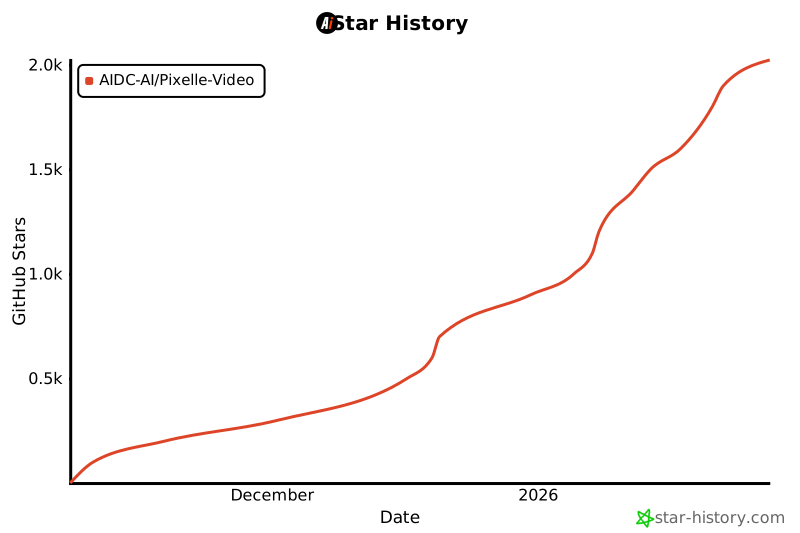](https://star-history.com/#AIDC-AI/Pixelle-Video&Date) |
| 470 |