| 1 | # ALLWEONE® AI Presentation Generator |
| 2 | |
| 3 | [](https://opensource.org/licenses/MIT) |
| 4 | [](https://nextjs.org/) |
| 5 | [](https://tailwindcss.com/) |
| 6 | [](https://platejs.org) |
| 7 | |
| 8 | ⭐ **Help us reach more developers and grow the ALLWEONE community. Star this repo!** |
| 9 | |
| 10 | An open-source, AI-powered presentation generator alternative to Gamma.app that creates beautiful, customizable slides in minutes. This tool is part of the broader ALLWEONE AI platform. |
| 11 | |
| 12 | <https://github.com/user-attachments/assets/a21dbd49-75b8-4822-bcec-a75b581d9c60> |
| 13 | |
| 14 | ## 🔗 Quick Links |
| 15 | |
| 16 | - [Live Demo](http://presentation.allweone.com) |
| 17 | - [Video Tutorial](https://www.youtube.com/watch?v=UUePLJeFqVQ) |
| 18 | - [Discord Community](https://discord.gg/fsMHMhAHRV) |
| 19 | - [Contributing Guidelines](CONTRIBUTING.md) |
| 20 | |
| 21 | ## 📋 Table of Contents |
| 22 | |
| 23 | - [Features](#-features) |
| 24 | - [Tech Stack](#-tech-stack) |
| 25 | - [Getting Started](#-getting-started) |
| 26 | - [Prerequisites](#prerequisites) |
| 27 | - [Installation](#installation) |
| 28 | - [Database Setup](#database-setup) |
| 29 | - [Usage](#-usage) |
| 30 | - [Creating a Presentation](#creating-a-presentation) |
| 31 | - [Custom Themes](#custom-themes) |
| 32 | - [Local Models Guide](#-local-models-guide) |
| 33 | - [Project Structure](#-project-structure) |
| 34 | - [Roadmap](#️-roadmap) |
| 35 | - [Contributing](#-contributing) |
| 36 | - [License](#-license) |
| 37 | - [Acknowledgements](#-acknowledgements) |
| 38 | - [Support](#-support) |
| 39 | |
| 40 | ## 🌟 Features |
| 41 | |
| 42 | ### Core Functionality |
| 43 | |
| 44 | - **AI-Powered Content Generation**: Create complete presentations on any topic with AI |
| 45 | - **Outline-First Workflow**: Generate an outline first, review it, then turn it into slides |
| 46 | - **Customizable Slides**: Choose the text model, number of slides, language, and whether web search is enabled |
| 47 | - **Blank Presentations**: Start from scratch when you do not want AI-generated content |
| 48 | - **Editable Outlines**: Review and modify AI-generated outlines before finalizing |
| 49 | - **Real-Time Generation**: Watch your presentation build live as content is created |
| 50 | - **Auto-Save**: Everything saves automatically as you work |
| 51 | |
| 52 | ### Design & Customization |
| 53 | |
| 54 | - **Multiple Themes**: 38 built-in themes are available out of the box |
| 55 | - **Custom Theme Creation**: Create, save, and reuse your own themes |
| 56 | - **PPTX Theme Import**: Import theme inspiration directly from PowerPoint files |
| 57 | - **Full Editability**: Modify text, fonts, and design elements as needed |
| 58 | - **Image Generation**: Choose different AI image generation models for your slides |
| 59 | - **Audience-Focused Styles**: Select between professional and casual presentation styles |
| 60 | |
| 61 | ### Presentation Tools |
| 62 | |
| 63 | - **Presentation Mode**: Present directly from the application |
| 64 | - **Public Sharing**: Generate a shareable public link for presentations |
| 65 | - **Presentation Recording**: Record presentations with microphone and webcam controls |
| 66 | - **PowerPoint Export**: Export presentations to `.pptx` |
| 67 | - **Charts, Infographics, and Media Embeds**: Add richer visual content beyond plain text slides |
| 68 | - **Rich Text Editing**: Powered by Plate Editor for comprehensive text and image handling |
| 69 | - **Drag and Drop**: Intuitive slide reordering and element manipulation |
| 70 | |
| 71 | ## 🧰 Tech Stack |
| 72 | |
| 73 | | Category | Technologies | |
| 74 | | ------------------ | ------------------------------------------ | |
| 75 | | **Framework** | Next.js, React, TypeScript | |
| 76 | | **Styling** | Tailwind CSS | |
| 77 | | **Database** | PostgreSQL with Prisma ORM | |
| 78 | | **AI Integration** | OpenAI API, Together AI, Ollama, LM Studio | |
| 79 | | **Authentication** | NextAuth.js | |
| 80 | | **UI Components** | Radix UI | |
| 81 | | **Text Editor** | Plate Editor | |
| 82 | | **File Uploads** | UploadThing | |
| 83 | | **Drag & Drop** | DND Kit | |
| 84 | |
| 85 | ## 🚀 Getting Started |
| 86 | |
| 87 | ### Prerequisites |
| 88 | |
| 89 | Before you begin, ensure you have the following installed: |
| 90 | |
| 91 | - Node.js 18.x or higher |
| 92 | - npm, yarn, or pnpm package manager |
| 93 | - PostgreSQL database |
| 94 | - Google Client ID and Secret (for authentication) |
| 95 | - Optional provider keys depending on the features you want to use: |
| 96 | - OpenAI API key (for cloud text generation) |
| 97 | - Together AI API key (for image generation) |
| 98 | - FAL API key (for additional image generation flows) |
| 99 | - Tavily API key (for web search) |
| 100 | - Unsplash access key (for stock images) |
| 101 | |
| 102 | ### Installation |
| 103 | |
| 104 | 1. **Clone the repository** |
| 105 | |
| 106 | ```bash |
| 107 | git clone git@github.com:allweonedev/presentation-ai.git |
| 108 | cd presentation-ai |
| 109 | ``` |
| 110 | |
| 111 | 2. **Install dependencies** |
| 112 | |
| 113 | ```bash |
| 114 | pnpm install |
| 115 | ``` |
| 116 | |
| 117 | 3. **Set up environment variables** |
| 118 | |
| 119 | Create a `.env` file in the root directory with the following variables: |
| 120 | |
| 121 | ```env |
| 122 | # Database |
| 123 | DATABASE_URL="postgresql://username:password@localhost:5432/presentation_ai" |
| 124 | |
| 125 | # Authentication |
| 126 | NEXTAUTH_SECRET="" |
| 127 | NEXTAUTH_URL="http://localhost:3000" |
| 128 | |
| 129 | # Google OAuth Provider |
| 130 | GOOGLE_CLIENT_ID="" |
| 131 | GOOGLE_CLIENT_SECRET="" |
| 132 | |
| 133 | # AI Providers |
| 134 | OPENAI_API_KEY="" |
| 135 | TOGETHER_AI_API_KEY="" |
| 136 | FAL_API_KEY="" |
| 137 | |
| 138 | # File Upload Service |
| 139 | UPLOADTHING_TOKEN="" |
| 140 | |
| 141 | # Optional search and media providers |
| 142 | UNSPLASH_ACCESS_KEY="" |
| 143 | TAVILY_API_KEY="" |
| 144 | ``` |
| 145 | |
| 146 | > 💡 **Tip**: Copy `.env.example` to `.env` and fill in your actual values. If you plan to use local text models through Ollama or LM Studio, you can run text generation without an `OPENAI_API_KEY`. |
| 147 | |
| 148 | ### Database Setup |
| 149 | |
| 150 | 1. **Initialize the database** |
| 151 | |
| 152 | ```bash |
| 153 | pnpm db:push |
| 154 | ``` |
| 155 | |
| 156 | 2. **Start the development server** |
| 157 | |
| 158 | ```bash |
| 159 | pnpm dev |
| 160 | ``` |
| 161 | |
| 162 | 3. **Open the application** |
| 163 | |
| 164 | Navigate to [http://localhost:3000](http://localhost:3000) in your browser. |
| 165 | |
| 166 | ### Available Scripts |
| 167 | |
| 168 | ```bash |
| 169 | pnpm dev # Start the Next.js dev server |
| 170 | pnpm build # Build the application |
| 171 | pnpm start # Start the production server |
| 172 | pnpm db:push # Push the Prisma schema to the database |
| 173 | pnpm db:studio # Open Prisma Studio |
| 174 | pnpm type # Run TypeScript type-checking |
| 175 | pnpm check # Run Biome checks |
| 176 | pnpm lint # Run Biome linting |
| 177 | ``` |
| 178 | |
| 179 | ## 💻 Usage |
| 180 | |
| 181 | ### Creating a Presentation |
| 182 | |
| 183 | Follow these steps to create your first AI-generated presentation: |
| 184 | |
| 185 | 1. Sign in to the app |
| 186 | 1. Navigate to the presentation dashboard |
| 187 | 1. Enter your presentation topic |
| 188 | 1. Choose a text model (OpenAI, Ollama, or LM Studio) |
| 189 | 1. Choose the number of slides (recommended: 5-10) |
| 190 | 1. Select your preferred language |
| 191 | 1. Toggle web search if you want outside context included |
| 192 | 1. Click **"Generate Outline"** |
| 193 | 1. Review and edit the AI-generated outline |
| 194 | 1. Select a theme for your presentation |
| 195 | 1. Choose an image source (ai / stock) |
| 196 | 1. Select your presentation style (Professional/Casual) |
| 197 | 1. Click **"Generate Presentation"** |
| 198 | 1. Wait for the AI to create your slides in real-time |
| 199 | 1. Preview, edit, and refine your presentation as needed |
| 200 | 1. Present directly from the app or export your presentation |
| 201 | |
| 202 | ### Custom Themes |
| 203 | |
| 204 | Create personalized themes to match your brand or style: |
| 205 | |
| 206 | 1. Click **"Create New Theme"** |
| 207 | 2. Start from scratch or derive from an existing theme |
| 208 | 3. Customize colors, fonts, and layout |
| 209 | 4. Save your theme for future use |
| 210 | |
| 211 | ## 🧠 Local Models Guide |
| 212 | |
| 213 | ALLWEONE Presentation AI now supports both Ollama and LM Studio as local model providers. |
| 214 | |
| 215 | ### LM Studio |
| 216 | |
| 217 | 1. Install [LM Studio](https://lmstudio.ai). |
| 218 | 2. In the LM Studio app, turn the Server ON and enable CORS. |
| 219 | 3. Download any model you want to use inside LM Studio. |
| 220 | |
| 221 | ### Ollama |
| 222 | |
| 223 | 1. Install [Ollama](https://ollama.com). |
| 224 | 2. Download whichever model you want to use (for example: `ollama pull llama3.1`). |
| 225 | |
| 226 | ### Using Local Models in the App |
| 227 | |
| 228 | 1. Open the app and open the text model selector. |
| 229 | 2. Choose the model you want to use. |
| 230 | 3. For LM Studio, load the model in LM Studio first. |
| 231 | 4. For Ollama, installed models appear automatically, and some recommended models can be downloaded on first use. |
| 232 | 5. Enjoy the generation. |
| 233 | |
| 234 | Notes: |
| 235 | |
| 236 | - OpenAI remains available as the default cloud text model. |
| 237 | - Models will automatically appear in the Model Selector when the LM Studio server or the Ollama daemon is running. |
| 238 | - Make sure LM Studio has CORS enabled so the browser can connect. |
| 239 | |
| 240 | ## 📁 Project Structure |
| 241 | |
| 242 | ```text |
| 243 | presentation-ai/ |
| 244 | ├── prisma/ # Prisma schema and seed data |
| 245 | ├── src/ |
| 246 | │ ├── ai/ # AI agents, tools, and server integrations |
| 247 | │ ├── app/ # Next.js app router pages, APIs, and server actions |
| 248 | │ ├── components/ |
| 249 | │ │ ├── notebook/ # Dashboard, generation flow, theme creation, recording UI |
| 250 | │ │ ├── presentation/ # Presentation editor, present mode, sharing, export |
| 251 | │ │ ├── plate/ # Plate editor plugins and UI |
| 252 | │ │ ├── prose-mirror/ # Outline editor |
| 253 | │ │ └── ui/ # Shared UI primitives |
| 254 | │ ├── hooks/ # Custom React hooks |
| 255 | │ ├── lib/ # Models, themes, export helpers, utilities |
| 256 | │ ├── provider/ # App providers |
| 257 | │ ├── server/ # Auth, DB, and share authorization helpers |
| 258 | │ ├── states/ # Zustand state stores |
| 259 | │ ├── styles/ # Global styles |
| 260 | │ ├── env.js # Environment validation |
| 261 | │ └── proxy.ts # Next.js proxy |
| 262 | ├── README.md |
| 263 | ├── package.json |
| 264 | ├── next.config.js |
| 265 | └── tsconfig.json |
| 266 | ``` |
| 267 | |
| 268 | ## 🗺️ Roadmap |
| 269 | |
| 270 | | Feature | Status | Notes | |
| 271 | | ---------------------------- | ----------------- | ------------------------------------------------------------------------------------------------ | |
| 272 | | Export to PowerPoint (.pptx) | 🟡 Partially Done | Works but the images and other component do not translate one to one | |
| 273 | | Media embedding | 🟡 Partially Done | Functionality is there, but ui/ux need improvement | |
| 274 | | Additional built-in themes | 🟡 In Progress | The app currently ships with 38 built-in themes, and the library is still growing | |
| 275 | | Mobile responsiveness | 🟡 In Progress | Improving layout and interactions for mobile devices | |
| 276 | | Advanced charts | 🟡 Partially Done | AI-generated charts and chart editing are available, with broader coverage still improving | |
| 277 | | Write e2e tests | 🔴 Not Started | Writing test to check the core features, so that we can catch if any changes break anything | |
| 278 | | Real-time collaboration | 🔴 Not Started | Multiple users editing the same presentation simultaneously | |
| 279 | | Export to PDF | 🔴 Not Started | High priority - allow users to download presentations as PDFs | |
| 280 | | Template library | 🔴 Not Started | Pre-built templates for common presentation types (pitch decks, reports, etc.) | |
| 281 | | Animation and transitions | 🔴 Not Started | Add slide transitions and element animations | |
| 282 | | Presentation recording | 🟡 Partially Done | Present mode already supports webcam and microphone recording controls | |
| 283 | | Cloud storage integration | 🔴 Not Started | Connect with Google Drive, Dropbox, OneDrive | |
| 284 | | Presentation analytics | 🔴 Not Started | Track views, engagement, and presentation performance | |
| 285 | | AI presenter notes | 🔴 Not Started | Auto-generate speaker notes for each slide | |
| 286 | | Custom font uploads | 🔴 Not Started | Allow users to upload and use their own fonts | |
| 287 | | Plugin system | 🔴 Not Started | Allow community to build and share extensions | |
| 288 | | API | 🔴 Not Started | Allow developers to use the allweone presentation to generate content in their own applications. | |
| 289 | |
| 290 | > 📝 **Note**: This roadmap is subject to change based on community feedback and priorities. Want to contribute to any of these features? Check out our [Contributing Guidelines](CONTRIBUTING.md)! |
| 291 | |
| 292 | ## 🤝 Contributing |
| 293 | |
| 294 | We welcome contributions from the community! Here's how you can help: |
| 295 | |
| 296 | ### How to Contribute |
| 297 | |
| 298 | 1. **Fork the repository** |
| 299 | 2. **Create a feature branch** |
| 300 | |
| 301 | ```bash |
| 302 | git checkout -b feature/amazing-feature |
| 303 | ``` |
| 304 | |
| 305 | 3. **Commit your changes** |
| 306 | |
| 307 | ```bash |
| 308 | git commit -m 'Add some amazing feature' |
| 309 | ``` |
| 310 | |
| 311 | 4. **Push to the branch** |
| 312 | |
| 313 | ```bash |
| 314 | git push origin feature/amazing-feature |
| 315 | ``` |
| 316 | |
| 317 | 5. **Open a Pull Request** |
| 318 | |
| 319 | ### Contribution Guidelines |
| 320 | |
| 321 | - Follow the existing code style and conventions |
| 322 | - Write clear commit messages |
| 323 | - Be respectful and constructive in discussions |
| 324 | |
| 325 | For more details, please read our [Contributing Guidelines](CONTRIBUTING.md). |
| 326 | |
| 327 | ## 📝 License |
| 328 | |
| 329 | This project is licensed under the MIT License - see the [LICENSE](LICENSE) file for details. |
| 330 | |
| 331 | ## 🙏 Acknowledgements |
| 332 | |
| 333 | Special thanks to the following projects and organizations: |
| 334 | |
| 335 | - [OpenAI](https://openai.com/) for AI generation capabilities |
| 336 | - [Plate Editor](https://plate.udecode.io/) for rich text editing |
| 337 | - [Radix UI](https://www.radix-ui.com/) for accessible UI components |
| 338 | - [Next.js](https://nextjs.org/) for the React framework |
| 339 | - All our open-source [contributors](https://github.com/allweonedev/presentation-ai/graphs/contributors) |
| 340 | |
| 341 | ## 💬 Support and Sponsors |
| 342 | |
| 343 | https://github.com/sponsors/allweonedev |
| 344 | |
| 345 | Need help or have questions? |
| 346 | |
| 347 | - 💬 [Discord Community](https://discord.gg/kZaJjZ7HjR) |
| 348 | - 🐛 [Report a Bug](https://github.com/allweonedev/presentation-ai/issues) |
| 349 | - 💡 [Request a Feature](https://github.com/allweonedev/presentation-ai/issues) |
| 350 | - 📧 Contact us via GitHub Issues or Discord |
| 351 | |
| 352 | --- |
| 353 | |
| 354 | **Built with ❤️ by the ALLWEONE® Team** |
| 355 | |
| 356 | **[⭐ Star us on GitHub](https://github.com/allweonedev/presentation-ai)** |
| 357 | |
| 358 | [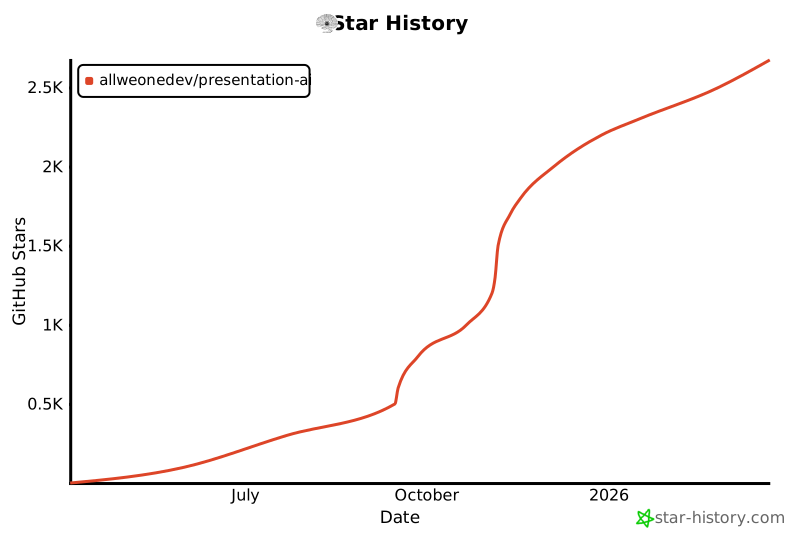](https://www.star-history.com/#allweonedev/presentation-ai&type=date&legend=top-left) |
| 359 |